One Wrist, Two Trackers: Fitbit Air and Apple Watch in Apple Health
Table of Contents
What’s better than one health tracker? Two health trackers. I kid, I kid. But maybe not :)
I like my Apple Watch Ultra. It is the better workout tracker, lets me leave my phone behind, and is useful as an actual smartwatch when I am out. It is also a fairly large slab of metal to wear around the house and, especially, to bed. If I take it off, though, I lose the boring background data which makes health tracking useful in the first place.
I recently got a Google Fitbit Air to fix this. It is small, light, screenless, lasts up to a week, and is comfortable enough that I can forget about it while sleeping. I wanted one device on my wrist at a time. The split is:
- Fitbit Air: at home and while sleeping
- Apple Watch Ultra: workouts, work, and generally whenever I go out
That sounds simple. The annoying part is getting both halves of the day into one health history.
Google Health can read data from Apple Health, but it cannot write Fitbit data back to it yet. Google says that is coming later in 2026. Until then, this is the setup I landed on after trying a few variations.
What each app does#
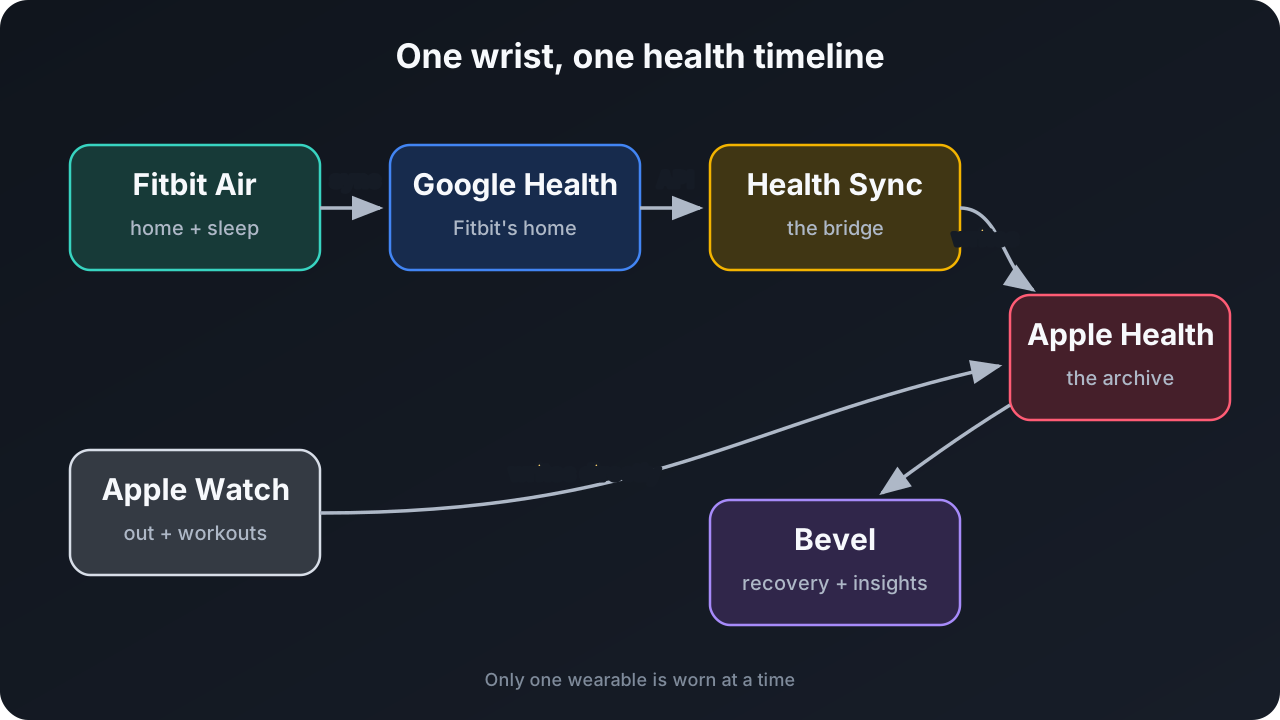
There are four apps in my setup, but each has a fairly clear job:
- Apple Health is the long-term store. Apple Watch data goes there directly, and I also want the Fitbit data there. My history remains available if I change the analysis or coaching app later.
- Google Health is where the Fitbit Air syncs and where I can see its Fitbit-specific insights, including the Ready metric.
- Health Sync moves the Fitbit data from my Google Health account to Apple Health. It talks directly to the service using my account.
- Bevel is where I track recovery, strength workouts, food, and macros. It is also much better than Apple Health at turning the combined raw data into useful resting-heart-rate and recovery numbers.
Bevel now has a direct Google Health integration. I tried that route first. It is convenient, though I still miss mundane metrics such as active and resting calories. Most data it reads from Google Health also stays out of Apple Health. I use Apple Health as the boring, replaceable foundation and put Bevel on top of it.
Setting it up#
First, pair the Fitbit Air with Google Health as usual and let it collect some data. The Fitbit syncs automatically during the day; opening Google Health and pulling down on the Today screen also forces a sync.
Next, install Health Sync and create a sync from Google Health (Fitbit) to Apple Health. Sign in to the Google account used by the Fitbit and grant Health Sync permission to write the corresponding categories in Apple Health.
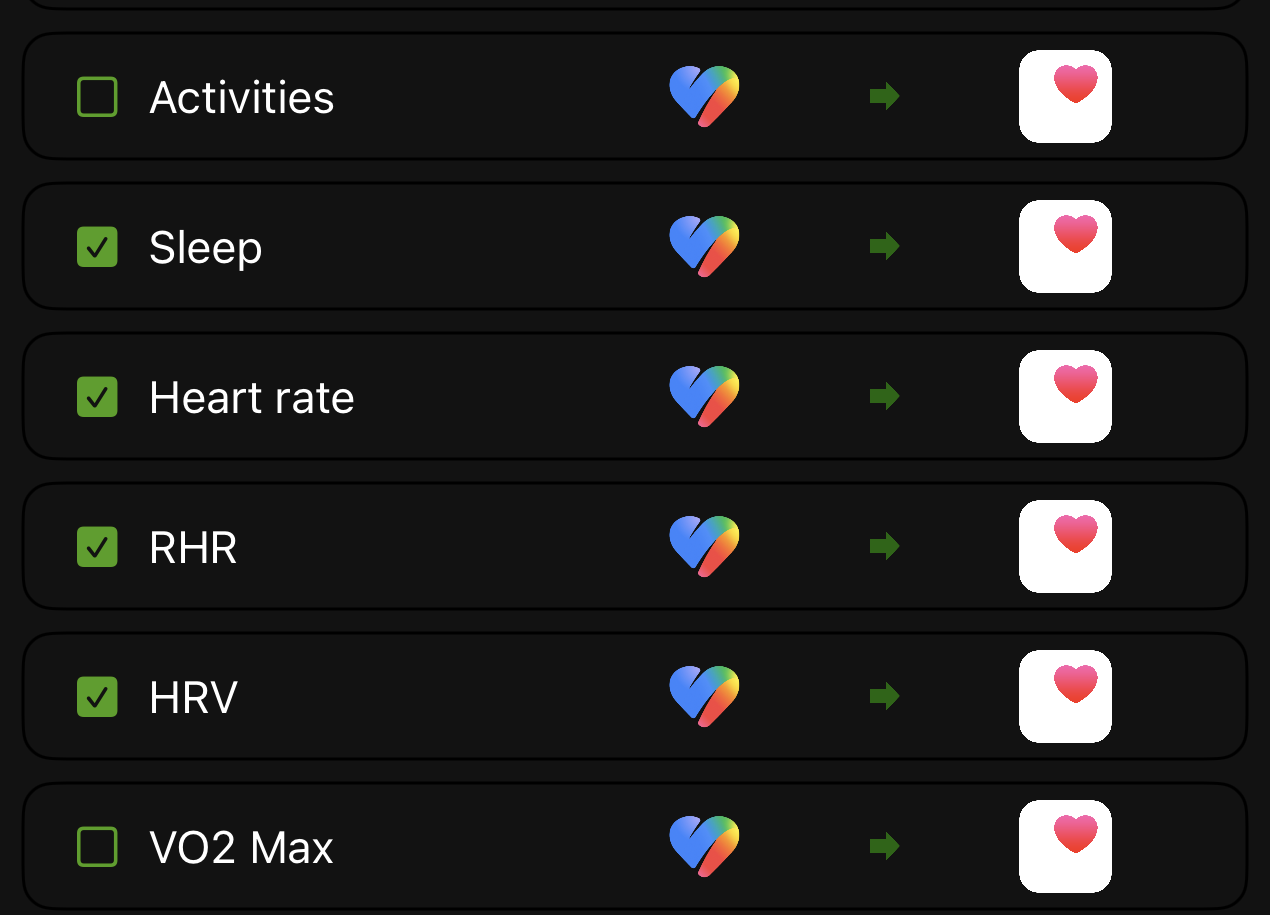
On Health Sync’s main screen, I enabled the measurements the Fitbit Air can provide: steps, distance, active energy, heart rate, resting heart rate, sleep, oxygen saturation, respiratory rate, and so on. The exact list may change as the apps add support, so the important part is the following set of exceptions:
| Metric | My setting | Why |
|---|---|---|
| Activities/workouts | Off | I record workouts on the Apple Watch. Syncing Fitbit’s automatically detected activities created duplicates. |
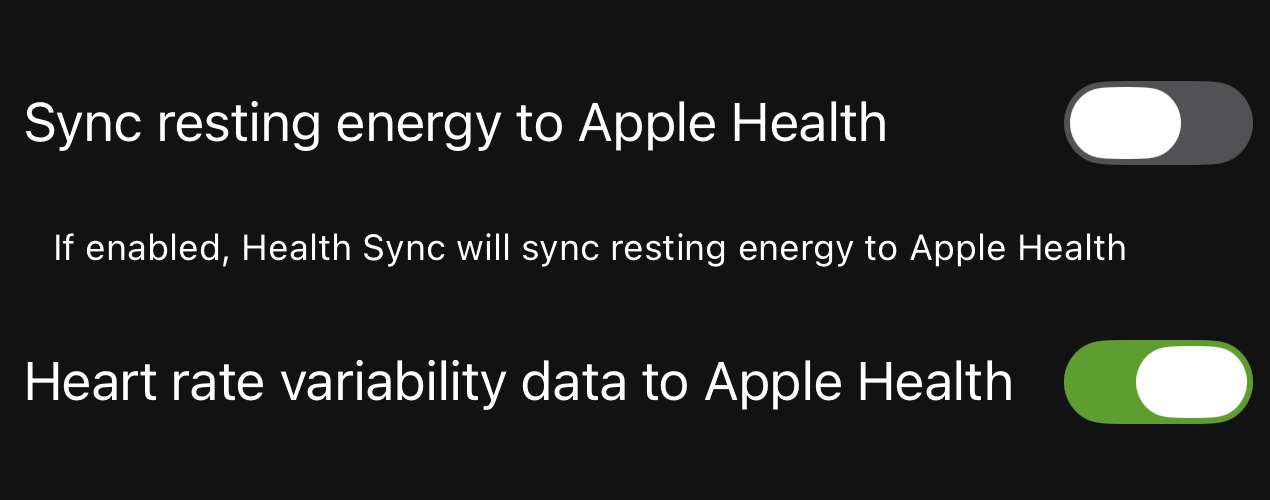
| Resting energy | Off | Apple Health was already estimating it, so the Fitbit value was counted again. |
| VO2 max | Off | My relevant workouts come from the Apple Watch, and I rely on its estimate. |
| HRV | On | I wear the Fitbit overnight, and sleep HRV is important for Bevel’s recovery calculation. |
| Resting heart rate | On | It brings the Fitbit’s overnight/resting value across, with one caveat explained below. |
HRV and resting energy have their own controls in Health Sync’s settings in addition to the main category list. I explicitly enabled HRV there and left resting energy disabled.
Health Sync runs in the background a few times per hour (in my use, roughly every 15 minutes). Google Health can stay closed. iOS decides when background work gets to run, so the apps can disagree for a few minutes.
Finally, give Bevel access to Apple Health. In this arrangement I use the combined Apple Health data and leave Bevel’s direct Google Health connection disabled. This avoids creating two paths for the same samples.
The three numbers that need special care#
Combining two ecosystems involves more than ticking every box. Some numbers have the same label but are produced differently.
HRV#
Apple and Fitbit use different sampling and calculation methods for HRV. Mixing their HRV samples makes the raw HRV chart in Apple Health a questionable place to compare one day with another.
I still sync it because the Fitbit is the device on my wrist while I sleep, and overnight HRV is useful to Bevel’s recovery calculation. I use Bevel for that interpretation and Google Health for Fitbit’s Ready metric. I mostly ignore the mixed Apple Health HRV graph.
If a clean, single-device HRV trend matters more to you than having everything in Apple Health, the alternative is to disable HRV in Health Sync and connect Google Health directly to Bevel.
Resting heart rate#
Health Sync tends to bring Fitbit’s resting-heart-rate value across once a day, usually around midnight. Later, Apple Health may prefer a reading derived from the Apple Watch.
That gets weird with my usage pattern. I often put the Watch on just before a workout and take it off not long after. Those are hardly representative resting hours, so the daily resting-heart-rate value shown by Apple Health can be too high.
Bevel handles this better for me because it looks at the underlying heart-rate samples across the combined day and derives its own resting value. The raw samples are fine; Apple’s one-number summary is the part I mostly ignore.
Resting energy#
Syncing resting energy from both systems produced an obvious double count, so I disabled it in Health Sync and let Apple Health own that number.
There is a small trade-off. During the hours when the Apple Watch is off my wrist, its resting-energy estimate can lag or be a little low. In my data the difference looked small enough, roughly in the 5–10% range of resting energy, that I prefer it over a definite duplicate. I treat calorie burn as an estimate and care more about a consistent trend than exact precision.
What to expect day to day#
After the initial fiddling, the everyday routine is pleasantly uneventful. I take off the Fitbit and put on the Apple Watch when I leave or work out. When I am back, I swap them again. Heart rate, steps, sleep, oxygen saturation, and active energy eventually meet in Apple Health, and Bevel gets enough of the combined day to calculate recovery.
A few rough edges remain:
- Fitbit Air does not detect the standing pose needed for Apple’s Stand ring. If closing all three Apple Fitness rings matters to you, this setup will leave gaps.
- Apple Health sometimes fails to push updated values to an Apple Watch that is sitting unworn. Resting calories in particular may look stale until I put on and unlock the Watch.
- Sync has a delay. Give it a little time before assuming that data is missing.
- App updates can add new health categories or reset permissions. If one metric stops arriving, check both Health Sync and Apple Health → profile photo → Apps → Health Sync.
- Apple Health has a priority order for every data type. Under a metric, open Data Sources & Access if a number looks duplicated or the wrong source keeps winning.
I treat this as wellness data and use the trends to make decisions about sleep and training.
Is it worth all this?#
For me, yes. The setup takes longer to explain than it does to use. There is no daily exporting, no spreadsheet, and no ritual beyond swapping what is on my wrist.
The Fitbit Air covers the long, quiet stretches where comfort matters. The Apple Watch covers the shorter stretches where its screen, GPS, workout tracking, and independence from the phone are useful. Apple Health keeps the history, and Bevel makes sense of it.
The combined dataset has a few quirks, but it captures far more of my actual day while letting me wear only one device at a time.